
Issue found: Invalid Data safety section We reviewed your app's Data safety section in Play Console and found discrepancies between it and how the app collects and shares user data. All apps are required to complete an accurate Data safety section that discloses their data collection and sharing practices - this is a requirement even if your app does not collect any user data.
We detected user data transmitted off device that you have not disclosed in your app's Data safety section as user data collected.
Issue details
We found an issue in the following area(s):
6SPLIT_BUNDLE 2: Policy Declaration for Play Safety Label: Device Or Other IDs Data Type - Device Or Other IDs (some common examples may include Advertising ID, Android ID, IMEI, BSSID)**
3 Answers
Open
Google Play ConsoleApp content
Data safety => Manage
Overview click next
Answer the questions (then next):
Does your app collect or share any of the required user data types? = yes
Is all of the user data collected by your app encrypted in transit? = yes
Do you provide a way for users to request that their data is deleted? = yes
go to
Device or other IDsand check it thennextcheck Device or other IDs and manage it
answer the questions
Is this data collected, shared, or both? = Collected
Is this data processed ephemerally? = yes
Is this data required for your app, or can users choose whether it's collected? = Users can choose whether this data is collected
Why is this user data collected? = check
App functionality
then save
click next and save and app will review and approved by play store team
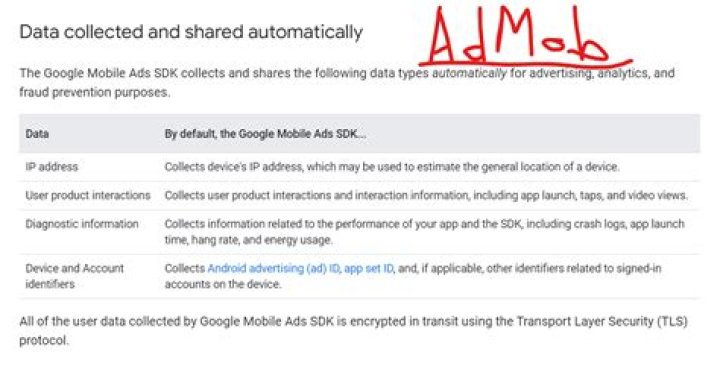
Only ads user AdMob, Facebook etc. - Data collected and shared automatically
- Open Google Play Console
- App content
- Data safety => Manage
- On Top Right side you see Import from CSV file. Here, simply upload the Data-Sefty.csv file ONLY.
then save
Click next and save and the app will review and approved by the play store team.
All solution are good but you just try simple way.
Follow This simple steps :
- Open Google Play Console
- App content
- Data safety => Manage
- Top Right side you see Import from CSV file. Here, simply upload Data-Sefty.csv file ONLY.




