This is ubuntu16.04. I can open Anaconda-Navigator from the terminal using anaconda-navigator, but when I click on it, it doesn't open. What am I missing?
12 Answers
To run anaconda-navigator:
$ source ~/anaconda3/bin/activate root $ anaconda-navigator Use the following command on your terminal (Ctrl + Alt + T):-
$ conda activate $ anaconda-navigator it works :
export PATH=/home/yourUserName/anaconda3/bin:$PATH after that run anaconda-navigator command. remember anaconda can't in Sudo mode, so don't use sudo at all.
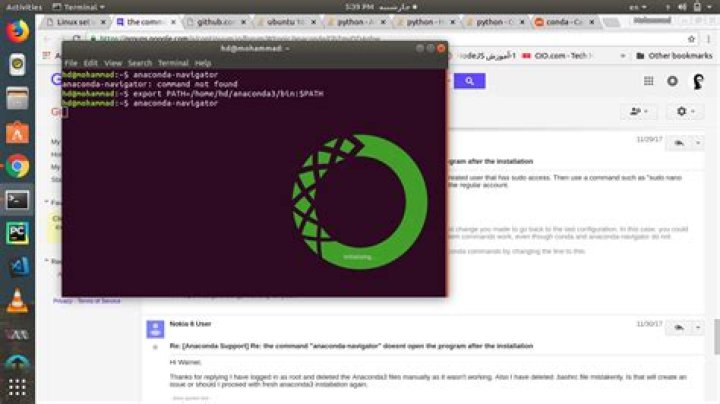
I am using Ubuntu 16.04. When I installed anaconda I was facing the same problem. I tried this and it resolved my problem.
step 1 : $ conda install -c anaconda anaconda-navigator
step 2 : $ anaconda-navigator
Hope it will help.
1Simply create a new text document called "anaconda-navigator.desktop" in your home directory by the terminal command:
gedit anaconda-navigator.desktop Then enter the following in your text document:
#!/usr/bin/env xdg-open [Desktop Entry] Name=Anaconda Version=2.0 Type=Application Exec=/path/to/anaconda-navigator Icon=/path/to/selected/icon Comment=Open Anaconda Navigator Terminal=false Save the file, then move it to your local applications folder:
mv anaconda-navigator.desktop ~/.local/share/applications/ Once this is done, you will be able to search for "Anaconda" on your applications screen, right click, and add to favorites. This way you don't have to go through the terminal every time!
2add anaconda installation path to .bashrc
export PATH="$PATH:/home/username/anaconda3/bin" load in terminal
$ source ~/.bashrc run from terminal
$ anaconda-navigator Try this:
First go to the anaconda3 binaries directory by running
cd anaconda3/bin and now use this following command to open the anaconda-navigator
./anaconda-navigator If all the above methods are not working, you probably install anaconda with root privileges. Remove it with sudo rm -rf /root/anaconda3 and reinstall without sudo.
OPEN TERMINAL
export PATH=/home/yourUserName/anaconda3/bin:$PATH anaconda-navigator This will get you going! cheers!
By default anaconda is installed at /root/anaconda3 path, if you want to access it then you should run
- su -
- cd /root/anaconda3/bin
- ./jupyter-notebook or ./anaconda-navigator
If you want to change the path, just login as a admin and copy folder to /opt/ or reinstall it.
I am running Anaconda Navigator on Kubuntu 17.04 & getting a successful launch of the navigator window. Not knowing any of your error messages or statement; you could try reinstalling with command: conda install -c anaconda anaconda-navigator
In my case, I don't need to set up anything further after installing Anaconda on Ubuntu
here is my screenshot for the version info. 




