I am trying to run a Django app on my VPS running Debian 5. When I run a demo app, it comes back with this error:
File "/usr/local/lib/python2.5/site-packages/django/utils/importlib.py", line 35, in import_module __import__(name) File "/usr/local/lib/python2.5/site-packages/django/db/backends/sqlite3/base.py", line 30, in <module> raise ImproperlyConfigured, "Error loading %s: %s" % (module, exc) ImproperlyConfigured: Error loading either pysqlite2 or sqlite3 modules (tried in that order): No module named _sqlite3 Looking at the Python install, it gives the same error:
Python 2.5.2 (r252:60911, May 12 2009, 07:46:31) [GCC 4.1.2 20061115 (prerelease) (Debian 4.1.1-21)] on linux2 Type "help", "copyright", "credits" or "license" for more information. >>> import sqlite3 Traceback (most recent call last): File "<stdin>", line 1, in <module> File "/usr/local/lib/python2.5/sqlite3/__init__.py", line 24, in <module> from dbapi2 import * File "/usr/local/lib/python2.5/sqlite3/dbapi2.py", line 27, in <module> from _sqlite3 import * ImportError: No module named _sqlite3 >>> Reading on the web, I learn that Python 2.5 should come with all the necessary SQLite wrappers included. Do I need to reinstall Python, or is there another way to get this module up and running?
126 Answers
It seems your makefile didn't include the appropriate .so file. You can correct this problem with the steps below:
- Install
sqlite-devel(orlibsqlite3-devon some Debian-based systems) - Re-configure and re-compiled Python with
./configure --enable-loadable-sqlite-extensions && make && sudo make install
Note
The sudo make install part will set that python version to be the system-wide standard, which can have unforseen consequences. If you run this command on your workstation, you'll probably want to have it installed alongside the existing python, which can be done with sudo make altinstall.
I had the same problem (building python2.5 from source on Ubuntu Lucid), and import sqlite3 threw this same exception. I've installed libsqlite3-dev from the package manager, recompiled python2.5, and then the import worked.
I had the same problem with Python 3.5 on Ubuntu while using pyenv.
If you're installing the python using pyenv, it's listed as one of the common build problems. To solve it, remove the installed python version, install the requirements (for this particular case libsqlite3-dev), then reinstall the python version with
pyenv install <python-version> Then recreate virtualenv if needed.
1my python is build from source, the cause is missing options when exec configure python version:3.7.4
./configure --enable-loadable-sqlite-extensions --enable-optimizations make make install fixed
This is what I did to get it to work.
I am using pythonbrew(which is using pip) with python 2.7.5 installed.
I first did what Zubair(above) said and ran this command:
sudo apt-get install libsqlite3-dev Then I ran this command:
pip install pysqlite This fixed the database problem and I got confirmation of this when I ran:
python manager.py syncdb Install the
sqlite-develpackage:yum install sqlite-devel -yRecompile python from the source:
./configure make make altinstall
I found lots of people meet this problem because the Multi-version Python, on my own vps (cent os 7 x64), I solved it in this way:
Find the file "_sqlite3.so"
find / -name _sqlite3.soout:
/usr/lib64/python2.7/lib-dynload/_sqlite3.soFind the dir of python Standard library you want to use,
for me
/usr/local/lib/python3.6/lib-dynloadCopy the file:
cp /usr/lib64/python2.7/lib-dynload/_sqlite3.so /usr/local/lib/python3.6/lib-dynload
Finally, everything will be ok.
4My _sqlite3.so is in /usr/lib/python2.5/lib-dynload/_sqlite3.so. Judging from your paths, you should have the file /usr/local/lib/python2.5/lib-dynload/_sqlite3.so.
Try the following:
find /usr/local -name _sqlite3.so If the file isn't found, something may be wrong with your Python installation. If it is, make sure the path it's installed to is in the Python path. In the Python shell,
import sys print sys.path In my case, /usr/lib/python2.5/lib-dynload is in the list, so it's able to find /usr/lib/python2.5/lib-dynload/_sqlite3.so.
6I recently tried installing python 2.6.7 on my Ubuntu 11.04 desktop for some dev work. Came across similar problems to this thread. I mamaged to fix it by:
Adjusting the setup.py file to include the correct sqlite dev path. Code snippet from setup.py:
def sqlite_incdir: sqlite_dirs_to_check = [ os.path.join(sqlite_incdir, '..', 'lib64'), os.path.join(sqlite_incdir, '..', 'lib'), os.path.join(sqlite_incdir, '..', '..', 'lib64'), os.path.join(sqlite_incdir, '..', '..', 'lib'), '/usr/lib/x86_64-linux-gnu/' ]With the bit that I added being '/usr/lib/x86_64-linux-gnu/'.
After running make I did not get any warnings saying the sqlite support was not built (i.e., it built correctly :P ), but after running
make install, sqlite3 still did not import with the same "ImportError: No module named _sqlite3" whe running "import sqlite3".So, the library was compiled, but not moved to the correct installation path, so I copied the
.sofile (cp /usr/src/python/Python-2.6.7/build/lib.linux-x86_64-2.6/_sqlite3.so /usr/local/python-2.6.7/lib/python2.6/sqlite3/— these are my build paths, you will probably need to adjust them to your setup).
Voila! SQLite3 support now works.
2For Python 3.7.8 with Redhat 7 or Centos 7.
- Install sqlite-devel
$ yum install sqlite-devel - Compile and install Python3 with sqllite extensions
$ ./configure --enable-optimizations --enable-loadable-sqlite-extensions $ make install This worked for me in Redhat Centos 6.5:
yum install sqlite-devel pip install pysqlite sqlite3 ships with Python. I also had the same problem, I just uninstalled python3.6 and installed it again.
Uninstall existing python:
sudo apt-get remove --purge python3.6 Install python3.6:
sudo apt install build-essential checkinstall sudo apt install libreadline-gplv2-dev libncursesw5-dev libssl-dev libsqlite3-dev tk-dev libgdbm-dev libc6-dev libbz2-dev wget tar xvf Python-3.6.0.tar.xz cd Python-3.6.0/ ./configure sudo make altinstall Is the python-pysqlite2 package installed?
sudo apt-get install python-pysqlite2 I have the problem in FreeBSD 8.1:
- No module named _sqlite3 - It is solved by stand the port ----------
/usr/ports/databases/py-sqlite3 after this one can see:
OK ---------- '>>>' import sqlite3 ----- '>>>' sqlite3.apilevel ----- '2.0' Checking your settings.py file. Did you not just write "sqlite" instead of "sqlite3" for the database engine?
Putting answer for anyone who lands on this page searching for a solution for Windows OS:
You have to install pysqlite3 or db-sqlite3 if not already installed. you can use following to install.
- pip install pysqlite3
- pip install db-sqlite3
For me the issue was with DLL file of sqlite3.
Solution:
I took DLL file from sqlite site. This might vary based on your version of python installation.
I pasted it in the DLL directory of the env. for me it was "C:\Anaconda\Lib\DLLs", but check for yours.
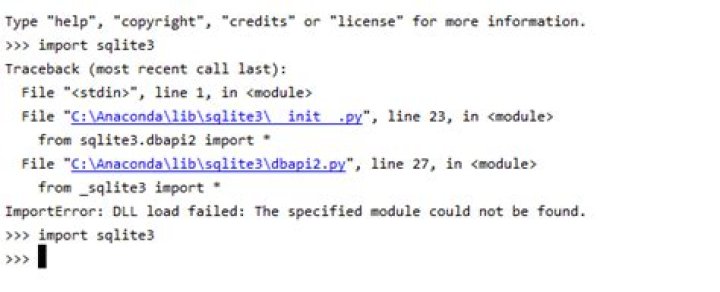
you must be in centos or redhat and compile python yourself, it is python‘s bug do this in your python source code dir and do this below
curl -sk | patch -p1 I got the same problem, nothing worked for me from the above ans but now I fixed it by
just remove python.pip and sqlite3 and reinstall
sudo apt-get remove python.pipsudo apt-get remove sqlite3
now install it again
sudo apt-get install python.pipsudo apt-get install sqlite3
in my case while installing sqlite3 again it showed some error then I typed
sqlite3
on terminal to check if it was removed or not and it started unpacking it
once the sqlite3 is installed fireup terminal and write
sqlite3database.db(to create a database)
I'm sure this will definitely help you
1I was disappointed this issue still exist till today. As I have recently been trying to install vCD CLI on CentOS 8.1 and I was welcomed with the same error when tried to run it. The way I had to resolve it in my case is as follow:
- Install SQLite3 from scratch with the proper prefix
- Make clean my Python Installation
- Run Make install to reinstall Python
As I have been doing this to create a different blogpost about how to install vCD CLI and VMware Container Service Extension. I have end up capturing the steps I used to fix the issue and put it in a separate blog post at:
I hope this helpful, as while the tips above had helped me get to a solution, I had to combine few of them and modify them a bit.
1Try installing sqlite like this if you are using FreeBSD.
pkg install py27-sqlite3-2.7.10_6 I had the same problem after installing Python 3.8.11 using asdf
To fix the issue:
I had to install libsqlite3-dev
sudo apt-get install libsqlite3-dev Then uninstall Python via asdf
asdf uninstall python 3.8.11 And install Python again via asdf
asdf install python 3.8.11 Download sqlite3:
wget Follow these steps to install:
$tar xvfz sqlite-autoconf-3071502.tar.gz $cd sqlite-autoconf-3071502 $./configure --prefix=/usr/local $make install The following worked for Python 3.9 with a virtual environment:
Install the sqlite3 library.
sudo apt-get install libsqlite3-devActivate the Python virtual environment.
source env/bin/activateCopy the sqlite3 file into the Python virtual environment and rename it to support Python 3.9.
cp /usr/lib/python3.8/lib-dynload/_sqlite3.cpython-38-x86_64-linux-gnu.so ./env/lib/python3.9/site-packages mv ./env/lib/python3.9/site-packages/_sqlite3.cpython-38-x86_64-linux-gnu.so ./env/lib/python3.9/site-packages/_sqlite3.cpython-39-x86_64-linux-gnu.so
Note, we're renaming 38 to 39 in the file name to support Python 3.9.
I faced this issue with multiple python dependent package while setup in python virtual enironment in Ubuntu.It is because of sqlite binding for our python.
Error I got:
from pysqlite2 import dbapi2 as sqlite3 ModuleNotFoundError: No module named 'pysqlite2' I resolved it by --enable-loadable-sqlite-extensions=yes 1.) First find your python or python version you used for creating virtual env. I have used python3.8 e.g
$ whereis python python: /usr/bin/python3.6m /usr/bin/python /usr/bin/python3.8 /usr/bin/python2.7-config /usr/bin/python3.8-config python $ cd /usr/bin $ls python3.8 python3.8-config Note: there will be many package check for pytho. you will find configure file for each python version, now use specific python version
ox:/usr/bin$ ./python3.8-config --enable-loadable-sqlite-extensions=yes OR
ox:/usr/bin$ ./python3.8-config --enable-optimizations --enable-loadable-sqlite-extensions Now, create your virtual env using that python version e.g Go the folder where you want to create the virtual env
$ python3.8 -m venv mlwen_jup_env $ source mlwen_jup_env/bin/activate Its done, now you can install packages
You need to install pysqlite in your python environment:
$ pip install pysqlite Try copying _sqlite3.so so that Python can find it.
It should be as simple as:
cp /usr/lib64/python2.6/lib-dynload/_sqlite3.so /usr/local/lib/python2.7/ Trust me, try it.




