I'm trying to download a file from google drive in a script, and I'm having a little trouble doing so. The files I'm trying to download are here.
I've looked online extensively and I finally managed to get one of them to download. I got the UIDs of the files and the smaller one (1.6MB) downloads fine, however the larger file (3.7GB) always redirects to a page which asks me whether I want to proceed with the download without a virus scan. Could someone help me get past that screen?
Here's how I got the first file working -
curl -L "" > phlat-1.0.tar.gz When I run the same on the other file,
curl -L "" > index4phlat.tar.gz I get the the following output - 
I notice on the third-to-last line in the link, there a &confirm=JwkK which is a random 4 character string but suggests there's a way to add a confirmation to my URL. One of the links I visited suggested &confirm=no_antivirus but that's not working.
I hope someone here can help with this!
1041 Answers
November 2021
You can use gdown. Consider also visiting that page for full instructions; this is just a summary and the source repo may have more up-to-date instructions.
Instructions
Install it with the following command:
pip install gdown After that, you can download any file from Google Drive by running one of these commands:
gdown # for files gdown <file_id> # alternative format gdown --folder # for folders gdown --folder --id <file_id> # this format works for folders too Example: to download the readme file from this directory
gdown The file_id should look something like 0Bz8a_Dbh9QhbNU3SGlFaDg. You can find this ID by right-clicking on the file of interest, and selecting Get link. As of November 2021, this link will be of the form:
# Files # Folders Caveats
- Only works on open access files. ("Anyone who has a link can View")
- Cannot download more than 50 files into a single folder.
- If you have access to the source file, you can consider using tar/zip to make it a single file to work around this limitation.
I wrote a Python snippet that downloads a file from Google Drive, given a shareable link. It works, as of August 2017.
The snipped does not use gdrive, nor the Google Drive API. It uses the requests module.
When downloading large files from Google Drive, a single GET request is not sufficient. A second one is needed, and this one has an extra URL parameter called confirm, whose value should equal the value of a certain cookie.
import requests def download_file_from_google_drive(id, destination): def get_confirm_token(response): for key, value in response.cookies.items(): if key.startswith('download_warning'): return value return None def save_response_content(response, destination): CHUNK_SIZE = 32768 with open(destination, "wb") as f: for chunk in response.iter_content(CHUNK_SIZE): if chunk: # filter out keep-alive new chunks f.write(chunk) URL = "" session = requests.Session() response = session.get(URL, params = { 'id' : id }, stream = True) token = get_confirm_token(response) if token: params = { 'id' : id, 'confirm' : token } response = session.get(URL, params = params, stream = True) save_response_content(response, destination) if __name__ == "__main__": import sys if len(sys.argv) is not 3: print("Usage: python google_drive.py drive_file_id destination_file_path") else: # TAKE ID FROM SHAREABLE LINK file_id = sys.argv[1] # DESTINATION FILE ON YOUR DISK destination = sys.argv[2] download_file_from_google_drive(file_id, destination) You can use the open source Linux / Unix command line tool gdrive.
To install it:
Download the binary. Choose the one that fits your architecture, for example
gdrive-linux-x64.Copy it to your path.
sudo cp gdrive-linux-x64 /usr/local/bin/gdrive; sudo chmod a+x /usr/local/bin/gdrive;
To use it:
Determine the Google Drive file ID. For that, right-click the desired file in the Google Drive website and choose "Get Link …". It will return something like
. Obtain the string behind the?id=and copy it to your clipboard. That's the file's ID.Download the file. Of course, use your file's ID instead in the following command.
gdrive download 0B7_OwkDsUIgFWXA1B2FPQfV5S8H
At first usage, the tool will need to obtain access permissions to the Google Drive API. For that, it will show you a link which you have to visit in a browser, and then you will get a verification code to copy&paste back to the tool. The download then starts automatically. There is no progress indicator, but you can observe the progress in a file manager or second terminal.
Source: A comment by Tobi on another answer here.
Additional trick: rate limiting. To download with gdrive at a limited maximum rate (to not swamp the network …), you can use a command like this (pv is PipeViewer):
gdrive download --stdout 0B7_OwkDsUIgFWXA1B2FPQfV5S8H | \ pv -br -L 90k | \ cat > file.ext This will show the amount of data downloaded (-b) and the rate of download (-r) and limit that rate to 90 kiB/s (-L 90k).
WARNING: This functionality is deprecated. See warning below in comments.
Have a look at this question: Direct download from Google Drive using Google Drive API
Basically you have to create a public directory and access your files by relative reference with something like
wget Alternatively, you can use this script:
10April 2022
First, extract the ID of your desire file from google drive:
In your browser, navigate to drive.google.com.
Right-click on the file, and click "Get a shareable link"
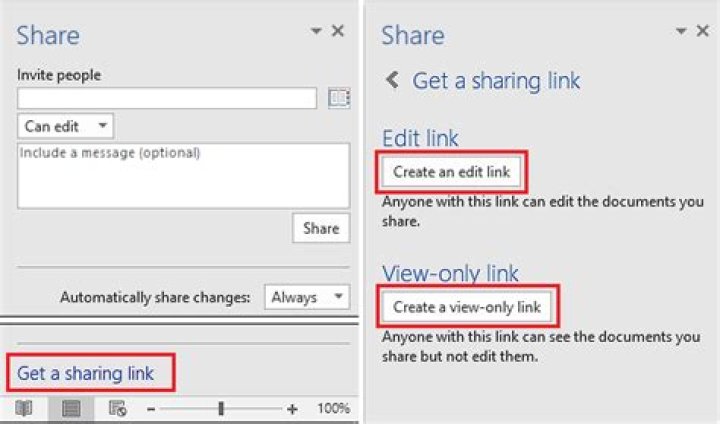
Then extract the ID of the file from URL:
Next, install
gdownPyPI module usingpip:pip install gdownFinally, download the file using
gdownand the intended ID:gdown --id <put-the-ID>
[NOTE]:
- In google-colab you have to use
!beforebashcommands.
(i.e.!gdown --id 1-1wAx7b-USG0eQwIBVwVDUl3K1_1ReCt) - You should change the permission of the intended file from "Restricted" to "Anyone with the link".
Here's a quick way to do this.
Make sure the link is shared, and it will look something like this:
Then, copy that FILEID and use it like this
wget --no-check-certificate ' -O FILENAME If the file is large and triggers the virus check page, you can use do this (but it will download two files, one html file and the actual file):
wget --no-check-certificate ' -r -A 'uc*' -e robots=off -nd Update as of March 2018.
I tried various techniques given in other answers to download my file (6 GB) directly from Google drive to my AWS ec2 instance but none of them work (might be because they are old).
So, for the information of others, here is how I did it successfully:
- Right-click on the file you want to download, click share, under link sharing section, select "anyone with this link can edit".
- Copy the link. It should be in this format:
- Copy the FILEIDENTIFIER portion from the link.
Copy the below script to a file. It uses curl and processes the cookie to automate the downloading of the file.
#!/bin/bash fileid="FILEIDENTIFIER" filename="FILENAME" curl -c ./cookie -s -L "" > /dev/null curl -Lb ./cookie " '/download/ {print $NF}' ./cookie`&id=${fileid}" -o ${filename}As shown above, paste the FILEIDENTIFIER in the script. Remember to keep the double quotes!
- Provide a name for the file in place of FILENAME. Remember to keep the double quotes and also include the extension in FILENAME (for example,
myfile.zip). - Now, save the file and make the file executable by running this command in terminal
sudo chmod +x download-gdrive.sh. - Run the script using `./download-gdrive.sh".
PS: Here is the Github gist for the above given script:
9ggID='put_googleID_here' ggURL=' filename="$(curl -sc /tmp/gcokie "${ggURL}&id=${ggID}" | grep -o '="uc-name.*</span>' | sed 's/.*">//;s/<.a> .*//')" getcode="$(awk '/_warning_/ {print $NF}' /tmp/gcokie)" curl -Lb /tmp/gcokie "${ggURL}&confirm=${getcode}&id=${ggID}" -o "${filename}" How does it work?
Get cookie file and html code with curl.
Pipe html to grep and sed and search for file name.
Get confirm code from cookie file with awk.
Finally download file with cookie enabled, confirm code and filename.
curl -Lb /tmp/gcokie "" -o "SomeBigFile.zip" If you dont need filename variable curl can guess it
-L Follow redirects
-O Remote-name
-J Remote-header-name
curl -sc /tmp/gcokie "${ggURL}&id=${ggID}" >/dev/null getcode="$(awk '/_warning_/ {print $NF}' /tmp/gcokie)" curl -LOJb /tmp/gcokie "${ggURL}&confirm=${getcode}&id=${ggID}" To extract google file ID from URL you can use:
echo "gURL" | egrep -o '(\w|-){26,}' # match more than 26 word characters OR
echo "gURL" | sed 's/[^A-Za-z0-9_-]/\n/g' | sed -rn '/.{26}/p' # replace non-word characters with new line, # print only line with more than 26 word characters The easy way:
(if you just need it for a one-off download)
- Go to the Google Drive webpage that has the download link
- Open your browser console and go to the "network" tab
- Click the download link
- Wait for it the file to start downloading, and find the corresponding request (should be the last one in the list), then you can cancel the download
- Right click on the request and click "Copy as cURL" (or similar)
You should end up with something like:
curl ' blah blah...............gEIqZ3KAQ==' --compressed Past it in your console, add > my-file-name.extension to the end (otherwise it will write the file into your console), then press enter :)
The link does have some kind of expiration in it, so it won't work to start a download after a few minutes of generating that first request.
8The default behavior of google drive is to scan files for viruses if the file is to big it will prompte the user and notifies him that the file could not be scanned.
At the moment the only workaround I found is to share the file with the web and create a web resource.
Quote from the google drive help page:
With Drive, you can make web resources — like HTML, CSS, and Javascript files — viewable as a website.
To host a webpage with Drive:
- Open Drive at drive.google.com and select a file.
- Click the Share button at the top of the page.
- Click Advanced in the bottom right corner of the sharing box.
- Click Change....
- Choose On - Public on the web and click Save.
- Before closing the sharing box, copy the document ID from the URL in the field below "Link to share". The document ID is a string of uppercase and lowercase letters and numbers between slashes in the URL.
- Share the URL that looks like " id] where [doc id] is replaced by the document ID you copied in step 6.
Anyone can now view your webpage.
So for example when you share a file on google drive publicly the sharelink looks like this:
Then you copy the file id and create a googledrive.com linke that look like this:
Based on the answer from Roshan Sethia
May 2018
Using WGET:
Create a shell script called wgetgdrive.sh as below:
#!/bin/bash # Get files from Google Drive # $1 = file ID # $2 = file name URL="" wget --load-cookies /tmp/cookies.txt "(wget --quiet --save-cookies /tmp/cookies.txt --keep-session-cookies --no-check-certificate $URL -O- | sed -rn 's/.*confirm=([0-9A-Za-z_]+).*/\1\n/p')&id=$1" -O $2 && rm -rf /tmp/cookies.txtGive the right permissions to execute the script
In terminal, run:
./wgetgdrive.sh <file ID> <filename>for example:
./wgetgdrive.sh 1lsDPURlTNzS62xEOAIG98gsaW6x2PYd2 images.zip
--UPDATED--
To download the file first get youtube-dl for python from here:
or install it with pip:
sudo python2.7 -m pip install --upgrade youtube_dl # or # sudo python3.6 -m pip install --upgrade youtube_dl UPDATE:
I just found out this:
Right click on the file you want to download from drive.google.com
Click
Get Sharable linkToggle On
Link sharing onClick on
Sharing settingsClick on the top dropdown for options
Click on More
Select
[x] On - Anyone with a linkCopy Link
(This is not a real file address) Copy the id after :
3PIY9dCoWRs-930HHvY-3-FOOPrIVoBAR Paste this into command line:
youtube-dl Paste the id behind open?id=
youtube-dl [GoogleDrive] 3PIY9dCoWRs-930HHvY-3-FOOPrIVoBAR: Downloading webpage [GoogleDrive] 3PIY9dCoWRs-930HHvY-3-FOOPrIVoBAR: Requesting source file [download] Destination: your_requested_filename_here-3PIY9dCoWRs-930HHvY-3-FOOPrIVoBAR [download] 240.37MiB at 2321.53MiB/s (00:01) Hope it helps
3I have been using the curl snippet of @Amit Chahar who posted a good answer in this thread. I found it useful to put it in a bash function rather than a separate .sh file
function curl_gdrive { GDRIVE_FILE_ID=$1 DEST_PATH=$2 curl -c ./cookie -s -L "" > /dev/null curl -Lb ./cookie " '/download/ {print $NF}' ./cookie`&id=${GDRIVE_FILE_ID}" -o ${DEST_PATH} rm -f cookie } that can be included in e.g a ~/.bashrc (after sourcing it ofcourse if not sourced automatically) and used in the following way
$ curl_gdrive 153bpzybhfqDspyO_gdbcG5CMlI19ASba imagenet.tar UPDATE 2022-03-01 - wget version that works also when virus scan is triggered
function wget_gdrive { GDRIVE_FILE_ID=$1 DEST_PATH=$2 wget --save-cookies cookies.txt ' -O- | sed -rn 's/.*confirm=([0-9A-Za-z_]+).*/\1/p' > confirm.txt wget --load-cookies cookies.txt -O $DEST_PATH '(<confirm.txt) rm -fr cookies.txt confirm.txt } sample usage:
$ wget_gdrive 1gzp8zIDo888AwMXRTZ4uzKCMiwKynHYP foo.out The easiest way is:
- Create download link and copy fileID
- Download with WGET:
wget --load-cookies /tmp/cookies.txt "(wget --quiet --save-cookies /tmp/cookies.txt --keep-session-cookies --no-check-certificate ' -O- | sed -rn 's/.*confirm=([0-9A-Za-z_]+).*/\1\n/p')&id=FILEID" -O FILENAME && rm -rf /tmp/cookies.txt
The above answers are outdated for April 2020, since google drive now uses a redirect to the actual location of the file.
Working as of April 2020 on macOS 10.15.4 for public documents:
# this is used for drive directly downloads function download-google(){ echo "" mkdir -p .tmp curl -c .tmp/$1cookies "" > .tmp/$1intermezzo.html; curl -L -b .tmp/$1cookies "$(egrep -o "https.+download" .tmp/$1intermezzo.html)" > $2; } # some files are shared using an indirect download function download-google-2(){ echo "" mkdir -p .tmp curl -c .tmp/$1cookies "" > .tmp/$1intermezzo.html; code=$(egrep -o "confirm=(.+)&id=" .tmp/$1intermezzo.html | cut -d"=" -f2 | cut -d"&" -f1) curl -L -b .tmp/$1cookies "" > $2; } # used like this download-google <id> <name of item.extension> No answer proposes what works for me as of december 2016 (source):
curl -L provided the Google Drive file has been shared with those having the link and {FileID} is the string behind ?id= in the shared URL.
Although I did not check with huge files, I believe it might be useful to know.
4All of the above responses seem to obscure the simplicity of the answer or have some nuances that are not explained.
If the file is shared publicly, you can generate a direct download link by just knowing the file ID. The URL must be in the form " " This works as of 11-22-2019. This does not require the receiver to log in to google but does require the file to be shared publicly.
In your browser, navigate to drive.google.com.
Right click on the file, and click "Get a shareable link"
- Open a new tab, select the address bar, and paste in the contents of your clipboard which will be the shareable link. You'll see the file displayed by Google's viewer. The ID is the number right before the "View" component of the URL:
Edit the URL so it is in the following format, replacing "[FILEID]" with the ID of your shared file:
That's your direct download link. If you click on it in your browser the file will now be "pushed" to your browser, opening the download dialog, allowing you to save or open the file. You can also use this link in your download scripts.
So the equivalent curl command would be:
curl -L "" > phlat-1.0.tar.gz I had the same problem with Google Drive.
Here's how I solved the problem using Links 2.
Open a browser on your PC, navigate to your file in Google Drive. Give your file a public link.
Copy the public link to your clipboard (eg right click, Copy link address)
Open a Terminal. If you're downloading to another PC/server/machine you should SSH to it as this point
Install Links 2 (debian/ubuntu method, use your distro or OS equivalent)
sudo apt-get install links2Paste the link in to your terminal and open it with Links like so:
links2 "paste url here"Navigate to the download link within Links using your Arrow Keys and press Enter
Choose a filename and it'll download your file
Use youtube-dl!
youtube-dl
You can also pass --get-url to get a direct download URL.
There's an open-source multi-platform client, written in Go: drive. It's quite nice and full-featured, and also is in active development.
$ drive help pull Name pull - pulls remote changes from Google Drive Description Downloads content from the remote drive or modifies local content to match that on your Google Drive Note: You can skip checksum verification by passing in flag `-ignore-checksum` * For usage flags: `drive pull -h` I was unable to get Nanoix's perl script to work, or other curl examples I had seen, so I started looking into the api myself in python. This worked fine for small files, but large files choked past available ram so I found some other nice chunking code that uses the api's ability to partial download. Gist here:
Note the bit about downloading client_secret json file from the API interface to your local directory.
Source$ cat gdrive_dl.py from pydrive.auth import GoogleAuth from pydrive.drive import GoogleDrive """API calls to download a very large google drive file. The drive API only allows downloading to ram (unlike, say, the Requests library's streaming option) so the files has to be partially downloaded and chunked. Authentication requires a google api key, and a local download of client_secrets.json Thanks to Radek for the key functions: """ def partial(total_byte_len, part_size_limit): s = [] for p in range(0, total_byte_len, part_size_limit): last = min(total_byte_len - 1, p + part_size_limit - 1) s.append([p, last]) return s def GD_download_file(service, file_id): drive_file = service.files().get(fileId=file_id).execute() download_url = drive_file.get('downloadUrl') total_size = int(drive_file.get('fileSize')) s = partial(total_size, 100000000) # I'm downloading BIG files, so 100M chunk size is fine for me title = drive_file.get('title') originalFilename = drive_file.get('originalFilename') filename = './' + originalFilename if download_url: with open(filename, 'wb') as file: print "Bytes downloaded: " for bytes in s: headers = {"Range" : 'bytes=%s-%s' % (bytes[0], bytes[1])} resp, content = service._http.request(download_url, headers=headers) if resp.status == 206 : file.write(content) file.flush() else: print 'An error occurred: %s' % resp return None print str(bytes[1])+"..." return title, filename else: return None gauth = GoogleAuth() gauth.CommandLineAuth() #requires cut and paste from a browser FILE_ID = 'SOMEID' #FileID is the simple file hash, like 0B1NzlxZ5RpdKS0NOS0x0Ym9kR0U drive = GoogleDrive(gauth) service = gauth.service #file = drive.CreateFile({'id':FILE_ID}) # Use this to get file metadata GD_download_file(service, FILE_ID) #!/bin/bash SOURCE="$1" if [ "${SOURCE}" == "" ]; then echo "Must specify a source url" exit 1 fi DEST="$2" if [ "${DEST}" == "" ]; then echo "Must specify a destination filename" exit 1 fi FILEID=$(echo $SOURCE | rev | cut -d= -f1 | rev) COOKIES=$(mktemp) CODE=$(wget --save-cookies $COOKIES --keep-session-cookies --no-check-certificate "" -O- | sed -rn 's/.*confirm=([0-9A-Za-z_]+).*/Code: \1\n/p') # cleanup the code, format is 'Code: XXXX' CODE=$(echo $CODE | rev | cut -d: -f1 | rev | xargs) wget --load-cookies $COOKIES "" -O $DEST rm -f $COOKIES I found a working solution to this... Simply use the following
wget --load-cookies /tmp/cookies.txt "(wget --quiet --save-cookies /tmp/cookies.txt --keep-session-cookies --no-check-certificate ' -O- | sed -rn 's/.*confirm=([0-9A-Za-z_]+).*/\1\n/p')&id=1HlzTR1-YVoBPlXo0gMFJ_xY4ogMnfzDi" -O besteyewear.zip && rm -rf /tmp/cookies.txt the easy way to down file from google drive you can also download file on colab
pip install gdown import gdown Then
url = ' output = 'spam.txt' gdown.download(url, output, quiet=False) or
fileid='0B9P1L7Wd2vU3VUVlFnbTgtS2c' gdown Here's a little bash script I wrote that does the job today. It works on large files and can resume partially fetched files too. It takes two arguments, the first is the file_id and the second is the name of the output file. The main improvements over previous answers here are that it works on large files and only needs commonly available tools: bash, curl, tr, grep, du, cut and mv.
#!/usr/bin/env bash fileid="$1" destination="$2" # try to download the file curl -c /tmp/cookie -L -o /tmp/probe.bin "" probeSize=`du -b /tmp/probe.bin | cut -f1` # did we get a virus message? # this will be the first line we get when trying to retrive a large file bigFileSig='<!DOCTYPE html><html><head><title>Google Drive - Virus scan warning</title><meta http-equiv="content-type" content="text/html; charset=utf-8"/>' sigSize=${#bigFileSig} if (( probeSize <= sigSize )); then virusMessage=false else firstBytes=$(head -c $sigSize /tmp/probe.bin) if [ "$firstBytes" = "$bigFileSig" ]; then virusMessage=true else virusMessage=false fi fi if [ "$virusMessage" = true ] ; then confirm=$(tr ';' '\n' </tmp/probe.bin | grep confirm) confirm=${confirm:8:4} curl -C - -b /tmp/cookie -L -o "$destination" "" else mv /tmp/probe.bin "$destination" fi There's an easier way.
Install cliget/CURLWGET from firefox/chrome extension.
Download the file from browser. This creates a curl/wget link that remembers the cookies and headers used while downloading the file. Use this command from any shell to download
2After messing around with this garbage. I've found a way to download my sweet file by using chrome - developer tools.
- At your google docs tab, Ctr+Shift+J (Setting --> Developer tools)
- Switch to Network tabs
- At your docs file, click "Download" --> Download as CSV, xlsx,....
It will show you the request in the "Network" console
Right click -> Copy -> Copy as Curl
- Your Curl command will be like this, and add
-oto create a exported file.curl ' -H 'authority: docs.google.com' -H 'upgrade-insecure-requests: 1' -H 'user-agent: Mozilla/5.0 (X..... -o server.xlsx
Solved!
3Alternative Method, 2020
Works well for headless servers. I was trying to download a ~200GB private file but couldn't get any of the other methods, mentioned in this thread, to work.
Solution
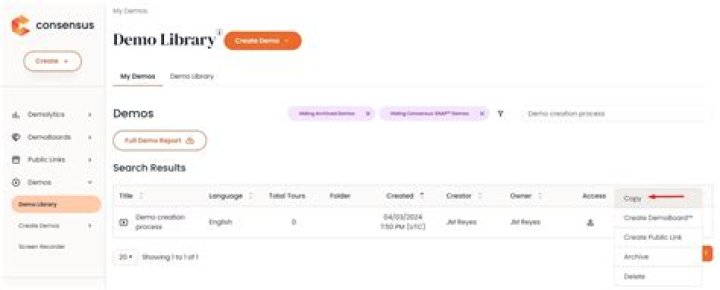
- (Skip this step if the file is already in your own google drive) Make a copy of the file you want to download from a Public/Shared Folder into your Google Drive account. Select File -> Right Click -> Make a copy
Install and setup Rclone, an open-source command line tool, to sync files between your local storage and Google Drive. Here's a quick tutorial to install and setup rclone for Google Drive.
Copy your file from Google Drive to your machine using Rclone
rclone copy mygoogledrive:path/to/file /path/to/file/on/local/machine -P -P argument helps to track progress of the download and lets you know when its finished.
Here is workaround which I came up download files from Google Drive to my Google Cloud Linux shell.
- Share the file to PUBLIC and with Edit permissions using advanced sharing.
- You will get a sharing link which would have an ID. See the link:-
- Copy that ID and Paste it in the following link:-
- The above link would be our download link.
- Use wget to download the file:-
- This command will download the file with name as [ID] with no extension and but with same file size on the same location where you ran the wget command.
- Actually, I downloaded a zipped folder in my practice. so I renamed that awkward file using:-
mv [ID] 1.zip
- then using
unzip 1.zip
we will get the files.
2For anyone who stumbles on this thread the following works as of May 2022 to get around the antivirus check on large files:
#!/bin/bash fileid="FILEIDENTIFIER" filename="FILENAME" html=`curl -c ./cookie -s -L ""` curl -Lb ./cookie " ${html}|grep -Po '(confirm=[a-zA-Z0-9\-_]+)'`&id=${fileid}" -o ${filename} 



