Recently, I looked at Facebook's React framework. It uses a concept called "the Virtual DOM," which I didn't really understand.
What is the Virtual DOM? What are the advantages?
314 Answers
React creates a tree of custom objects representing a part of the DOM. For example, instead of creating an actual DIV element containing a UL element, it creates a React.div object that contains a React.ul object. It can manipulate these objects very quickly without actually touching the real DOM or going through the DOM API. Then, when it renders a component, it uses this virtual DOM to figure out what it needs to do with the real DOM to get the two trees to match.
You can think of the virtual DOM like a blueprint. It contains all the details needed to construct the DOM, but because it doesn't require all the heavyweight parts that go into a real DOM, it can be created and changed much more easily.
5Let's take an example — though a very naive one: If you have something messed up in a room in your home and you need to clean it, what will be your first step? Will you be cleaning your room which is messed up or the whole house? The answer is definitely that you will be cleaning only the room which requires the cleaning. That's what the virtual DOM does.
Ordinary JS traverses or renders the whole DOM instead of rendering only the part which requires changes.
So whenever you have any changes, as in you want to add another <div> to your DOM then the virtual DOM will be created which actually does not do any changes in the actual DOM. Now with this virtual DOM, you will be checking the difference between this and your current DOM. And only the part which is different (in this case the new <div>) will be added instead of re-rendering the whole DOM.
What is the virtual DOM?
The virtual DOM is an in-memory representation of the real DOM elements generated by React components before any changes are made to the page.

It’s a step that happens between the render function being called and the displaying of elements on the screen.
A component’s render method returns some markup, but it’s not the final HTML yet. It’s the in-memory representation of what will become real elements (this is step 1). Then that output will be transformed into real HTML, which is what gets displayed in the browser (This is step 2).
So why go through all this to generate a virtual DOM? Simple answer — This is what allows react to be fast. It does this by means of virtual DOM diffing. Comparing two virtual trees — old and new — and make only the necessary changes into the real DOM.
A virtual DOM(VDOM) is not a new concept: .
VDOM is strategically to update DOM without redrawing all the nodes in a single page application. Finding a node in a tree structure is easy but the DOM tree for a SPA app can be drastically huge. Finding and updating a node/nodes in case of an event is not time efficient.
VDOM solves this problem by creating a high level abstraction of actual dom. The VDOM is a high level lightweight in-memory tree representation of actual DOM.
For example, consider adding a node in DOM; react keep a copy of VDOM in memory
- Create a VDOM with a new state
- Compare it with older VDOM using diffing.
- Update only different nodes in real DOM.
- Assign new VDOM as an older VDOM.
All the answers are great. I just came up with an analogy which probably can give a real-world metaphor.
The real DOM is like your room, nodes are the furniture in your room. The virtual DOM is like we draw a blueprint of this current room.
We all have the experience of moving furniture, it's very tiring (Same concept as updating views in computers). Therefore, whenever we want to change the position/add furniture (nodes), we want to only do the very necessary change.
Blueprint came for the rescue to achieve it. We draw a new blueprint and compare the difference with the original one. This lets us know what part has been changed and what part stays the same. We then do the necessary change to the real room (update the changed nodes on the real DOM). Hurray.
(Some might think, why do we have to rely on the virtual one and don't directly compare the real DOM? Well, in the analogy, comparing the real DOM means you have to create another real room and compare it with your original one. It's just too costly.)
This is a brief description and reiteration of the Virtual DOM often mentioned alongside ReactJS.
The DOM (Document Object Model) is an abstraction of structured text, which means it is made of HTML code and css. These HTML elements become nodes in the DOM. There are limitations to the previous methods of manipulating the DOM. Virtual DOM is an abstraction of the literal HTML DOM created well before React was created or used, but for our purposes we will use it in concert with ReactJS. The Virtual DOM is lightweight and detached from the DOM implementation in the browser. The Virtual DOM is essentially a screenshot (or copy) of the DOM at a given time. A way to look at it from a developers perspective is the DOM is the production environment and the Virtual DOM is the local (dev) environment. Each time the data changes in a React app a new Virtual DOM representation of the user interface is created.
The most basic method needed in order to create a static component in ReactJS are:
You must return code from the render method. You must convert every class to className since class is reserved word in JavaScript. Aside from the more major changes there are minor differences between the two DOMs including three attributes appearing in the Virtual DOM but not in the HTML DOM (key, ref and dangerouslySetInnerHTML).
An important thing to understand when working with the Virtual DOM is the difference between ReactElement and ReactComponent.
ReactElement
- A ReactElement is a light, stateless, immutable, virtual representation of a DOM Element.
- ReactElement - This is the primary type in React and resides in the Virtual DOM.
ReactElements can be rendered into HTML DOM
var root = React.createElement('div'); ReactDOM.render(root, document.getElementById('example'));JSX compiles HTML tags into ReactElements
var root = <div/>; ReactDOM.render(root, document.getElementById('example'));
ReactComponent
- ReactComponent - ReactComponent's are stateful components.
- React.createClass is considered a ReactComponent.
- Whenever state changes the component is rerendered.
Whenever a ReactComponent has a state change, we want as little change to the HTML DOM as possible so ReactComponent is converted to the ReactElement which can then be inserted to the Virtual DOM, compared and updated fast and easily.
When React knows the diff - it's converted to the low-level (HTML DOM) code, which is executed in the DOM.
It’s a neat concept: instead of manipulating the DOM directly, which is error prone and relies on mutable state, you instead output a value called the Virtual DOM. The Virtual DOM is then diffed with the current state of the DOM, which generates a list of DOM operations that would make the current DOM look like the new one. Those operations are applied quickly in a batch.
Taken from here.
Virtual DOM is an abstraction of the HTML DOM that selectively renders subtrees of nodes based upon state changes. It does the least amount of DOM manipulation possible in order to keep your components up to date.
1Virtual Dom is created one copy of Dom. Virtual dom is compared to dom, and virtual dom update only that part in dom which changed. it's not rendering the whole dom it's just changed the updated part of dom in dom. It's very time consuming and from this functionality, our app works fast.
Virtual DOM is a partial or full copy of the browser DOM tree structure. It is created by the frameworks like React and kept in the memory for manipulations via app code.
As and when necessary, virtual DOM is used by the app code to update the browser DOM – the DOM that actually represents the user interface.
Also, it is worth noting that Virtual DOM is just a design pattern and can be implemented by anyone even in plain javascript.
React batches the app state changes before pushing those to the real DOM. The latest virtual DOM diffing gives React all the impacted nodes. The impacted nodes of the virtual DOM are then pushed to the real DOM by a highly efficient process called reconciliation.
The below image demonstrates Virtual DOM diffing and reconciliation with real DOM in React
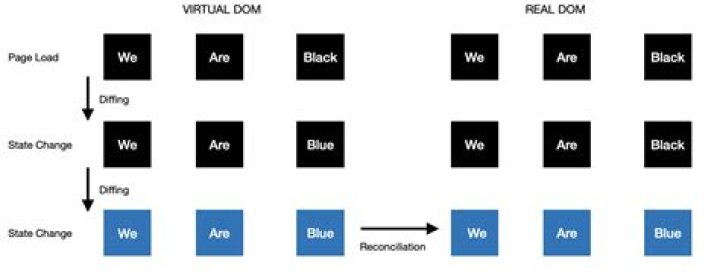
Read more here - React virtual DOM explained with examples
Advantage - Note that when you add, delete or modify a node in the DOM tree, the browser needs to perform calculations and adjust the screen layout and content to sync the user interface with the app state. In highly complex, reactive, and interactive applications where you see a continuous stream of data and events, the DOM may require frequent updates.
Updating DOM (& repainting the browser screen) at a high frequency is a big problem and that is where Virtual DOM in React js comes to the rescue.
React's structural unit is component. Each component has a state. Whenever the state of a component is changed, React modifies the V-DOM tree. Thereafter latest version of the V-DOM is compared with previous version of the V-DOM. After this calculation(diffing) when React knows which V-DOM objects have been changed it modifies only those objects in the R-DOM.
In layman's terms,
Say I have added a div element in DOM, React creates a copy of V-DOM without changing the whole R-DOM. This newly created V-DOM is compared with older V-DOM. It updates only different nodes in real DOM. Now the newly created V-DOM is regarded as previous version for upcoming V-DOM.
P.S. 1. So Unlike plain js Whole new version of V-DOM is created and R-DOM is partly updated. 2. React does not update every single change in state, rather updates to the R-DOM are sent in batches.
'In React world, the term “virtual DOM” is usually associated with React elements since they are the objects representing the user interface. '
import React, { Component } from 'react'; //You need to do this inside a module to import class App extends Component{ render(){ return ( <button>Hi</button> //This returns a virtual DOM ) } } The code inside return is actually a call to function React.createElement:
//render can be rewritten like this: render(){ return [ React.createElement( 'button', { key: null, ref: null, }, 'Hi', ) ] } which returns something like this:
{ $$typeof: Symbol.for('react.element'), type: "button", key: null, ref: null, props: { children: 'Hi', } } and this is virtual DOM. It's an JavaScript object which costs much less to manipulate than the actual DOM element created by
document.createElement('button'); which is also a JavaScript object looks like this:
accessKey: "" ariaAtomic: null ariaAutoComplete: null ariaBusy: null ariaChecked: null ariaColCount: null ariaColIndex: null ariaColSpan: null ariaCurrent: null ariaDescription: null ariaDisabled: null ariaExpanded: null ariaHasPopup: null ariaHidden: null ariaKeyShortcuts: null ariaLabel: null ariaLevel: null ariaLive: null ariaModal: null ariaMultiLine: null ariaMultiSelectable: null ariaOrientation: null ariaPlaceholder: null ariaPosInSet: null ariaPressed: null ariaReadOnly: null ariaRelevant: null ariaRequired: null ariaRoleDescription: null ariaRowCount: null ariaRowIndex: null ariaRowSpan: null ariaSelected: null ariaSetSize: null ariaSort: null ariaValueMax: null ariaValueMin: null ariaValueNow: null ariaValueText: null assignedSlot: null attributeStyleMap: StylePropertyMap {size: 0} attributes: NamedNodeMap {length: 0} autocapitalize: "" autofocus: false baseURI: "" childElementCount: 0 childNodes: NodeList [] children: HTMLCollection [] classList: DOMTokenList [value: ""] className: "" clientHeight: 0 clientLeft: 0 clientTop: 0 clientWidth: 0 contentEditable: "inherit" dataset: DOMStringMap {} dir: "" disabled: false draggable: false elementTiming: "" enterKeyHint: "" firstChild: null firstElementChild: null form: null formAction: "" formEnctype: "" formMethod: "" formNoValidate: false formTarget: "" hidden: false id: "" innerHTML: "" innerText: "" inputMode: "" isConnected: false isContentEditable: false labels: NodeList [] lang: "" lastChild: null lastElementChild: null localName: "button" name: "" namespaceURI: "" nextElementSibling: null nextSibling: null nodeName: "BUTTON" nodeType: 1 nodeValue: null nonce: "" offsetHeight: 0 offsetLeft: 0 offsetParent: null offsetTop: 0 offsetWidth: 0 onabort: null onanimationend: null onanimationiteration: null onanimationstart: null onauxclick: null onbeforecopy: null onbeforecut: null onbeforepaste: null onbeforexrselect: null onblur: null oncancel: null oncanplay: null oncanplaythrough: null onchange: null onclick: null onclose: null oncontextmenu: null oncopy: null oncuechange: null oncut: null ondblclick: null ondrag: null ondragend: null ondragenter: null ondragleave: null ondragover: null ondragstart: null ondrop: null ondurationchange: null onemptied: null onended: null onerror: null onfocus: null onformdata: null onfullscreenchange: null onfullscreenerror: null ongotpointercapture: null oninput: null oninvalid: null onkeydown: null onkeypress: null onkeyup: null onload: null onloadeddata: null onloadedmetadata: null onloadstart: null onlostpointercapture: null onmousedown: null onmouseenter: null onmouseleave: null onmousemove: null onmouseout: null onmouseover: null onmouseup: null onmousewheel: null onpaste: null onpause: null onplay: null onplaying: null onpointercancel: null onpointerdown: null onpointerenter: null onpointerleave: null onpointermove: null onpointerout: null onpointerover: null onpointerrawupdate: null onpointerup: null onprogress: null onratechange: null onreset: null onresize: null onscroll: null onsearch: null onseeked: null onseeking: null onselect: null onselectionchange: null onselectstart: null onstalled: null onsubmit: null onsuspend: null ontimeupdate: null ontoggle: null ontransitionend: null onvolumechange: null onwaiting: null onwebkitanimationend: null onwebkitanimationiteration: null onwebkitanimationstart: null onwebkitfullscreenchange: null onwebkitfullscreenerror: null onwebkittransitionend: null onwheel: null outerHTML: "<button></button>" outerText: "" ownerDocument: document parentElement: null parentNode: null part: DOMTokenList [value: ""] prefix: null previousElementSibling: null previousSibling: null scrollHeight: 0 scrollLeft: 0 scrollTop: 0 scrollWidth: 0 shadowRoot: null slot: "" spellcheck: true style: CSSStyleDeclaration {alignContent: "", alignItems: "", alignSelf: "", alignmentBaseline: "", all: "", …} tabIndex: 0 tagName: "BUTTON" textContent: "" title: "" translate: true type: "submit" validationMessage: "" validity: ValidityState {valueMissing: false, typeMismatch: false, patternMismatch: false, tooLong: false, tooShort: false, …} value: "" willValidate: true You can learn more about virtual DOM and React at
React keeps a lightweight representation of the real DOM in the memory, and that is known as the virtual DOM. When the state of an object changes, virtual DOM changes only that object in the real DOM, rather than updating all the objects.
let's make order and sense in this matter. React (or any other library) are a "layer" on javascript.
There is no such thing as virtual dom, there is unattached dom .
let me explain in simple javascript :
let vDom = {}; // this is a object that will be used to hold the elements let d = document.createElement('div'); d.innerHTML = 'hi, i am a new div'; vDom['newDiv'] = d; at this point we have created a Div which is not shown on the dom , because it has not attached
but we can access it, add attributes, values, change etc..
once we call : (for ex,add it to body)
document.body.appendChild(vDom['newDiv']) then we will see it;
for one how saw javascript libs come and go , i suggest to any one to do one simple thing : master JAVAscript, not layers :) 



